I’ll keep the chosen proposal and check the latest changes.
›All right, go ahead.

Cowork · Task BClient project
Codex · Task CClient project
In your apps




A voice mode keeps you in one conversation. SpeakApp keeps you in the loop across all your tasks.
Reading every AI session should not be your job.
No need to read each reply. SpeakApp reads it aloud, in full or summarized.
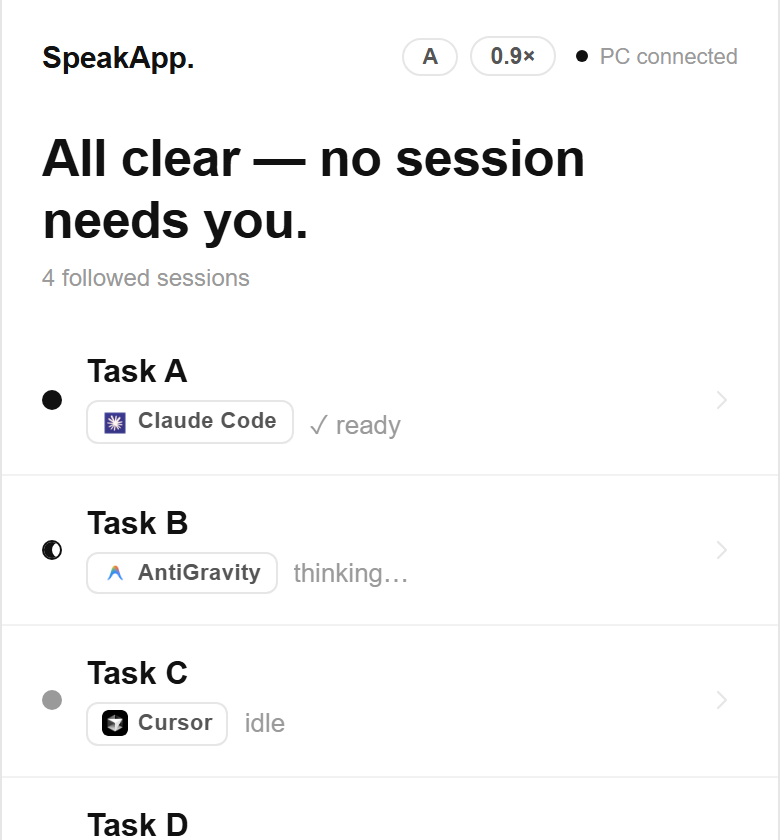
See what finished, is waiting, or got stuck.One click opens the right task.
Pick up the last point and propose next steps.
In 40 languages. It learns your words.
Built-in commands
Customizable
/recap
Choose the trigger and the text it types.
Customizable
Choose the trigger and the text it types.
Hey Speak
Select text, then ask what you need.
Copilot will remind you what you were doing, where the agent stands, and what deserves your attention.
Your task just finished its plan. Would you like me to read it aloud?
Okay, summarize it for me.
Coming soon
Step away from your desk for real.
PC on · Relay active
Personal voice · Entreprise
Create it in just 30 seconds.
Launch offer-50%
Instead of €12€6/month
For 3 months, then €12/month · for the first 100 subscribers
€0forever
No card required
The full product, with smaller allowances, so you can try it.
Free forever · No card needed
€4/month
Billed monthly
Listen to your AI agents without counting.
Sign-in required · No trial
Launch offer -50%
Instead of €12€6/month
For 3 months, then €12/month · for the first 100 subscribers
Dictate and listen throughout your day.
Save €18
Card required · No charge before day 15
€24/month
Billed monthly
Everything in Pro, plus premium voice.
Subscription arranged by email
14 days on Pro. A payment card is required at signup, but you are not charged until day 15. We notify you three days before.
Today, on Windows 10 and 11. On Mac, a beta is looking for testers: join the Mac beta. Linux: not for now.
SpeakApp does not store your conversation content on its servers. Our Security page documents the privacy policy, processing records, public sub-processor list, and how to exercise your rights.
Yes, from your account. There are no cancellation fees.
All four plans include the same product. Only Reading, dictation, and premium voice allowances vary. Free includes 50 readings and 30 minutes of dictation per month. Lecture offers unlimited Reading and 3 hours of dictation per month. Pro also makes dictation unlimited. Entreprise adds 12 hours of premium voice per month.
GPT Live is a conversation within ChatGPT. SpeakApp follows all your tasks as they progress without you. It reads the replies that are ready and returns your spoken answer to the right task. You can use both.
For voice-agent interactions: ChatGPT, Claude, Gemini, and Perplexity. For target apps: Cursor, VS Code, Windsurf, Claude Code, and Google Antigravity.
Yes for premium Cloud Dictation and the AI voice agent. Basic Smart Cleanup and PC voice commands work fully offline.
Entreprise costs €24/month or €230.40/year. You can arrange a subscription by email from the website, or select the plan in the installed app's Settings.
No. SpeakApp charges no VAT (French micro-enterprise exemption, Article 293 B), so there is nothing to reclaim and the displayed price is the total price. Your invoices remain downloadable from your account.
Free on Windows. Install SpeakApp, open your AI tool, and start talking.
Bring competing AI tools together through one voice. Keep your existing apps and models.
⤓ Download free for WindowsWindows 10/11 · Free · Pro at €12/month when you need more
 Chrome